
Reseller Panel
Private branded panel. We set it up for you on the first order — then buy credits, sell lines, and keep 100% profit.
Buy credits
Create lines
Sell & manage
Keep all profit

Your panel includes
Your brand only
White-label panel — no link to us
Full line control
Add, edit, remove anytime
All formats
Xtream · M3U · MAG · Enigma2
Live dashboard
Usage + expiry warnings
Sub-resellers
Your own sub-panels
Free 8K / 4K apps
For your customers
Support 24/7
Panel + WhatsApp
Telegram updates
Server & content news
Join our Telegram channel to stay updated on the latest content available through authorized playlists.
Inside the IPTV reseller panel
Before you buy credits, see the screens you will use every day. These are real views from the reseller panel, from the dashboard to line renewals.
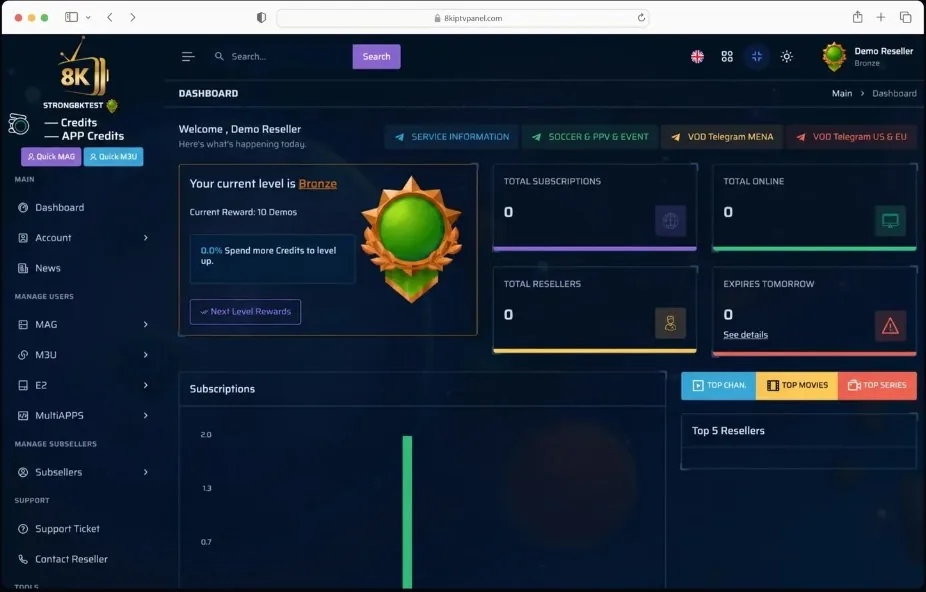
Dashboard overview
First, see your credits, current rank, active lines and lines that expire tomorrow on one screen.
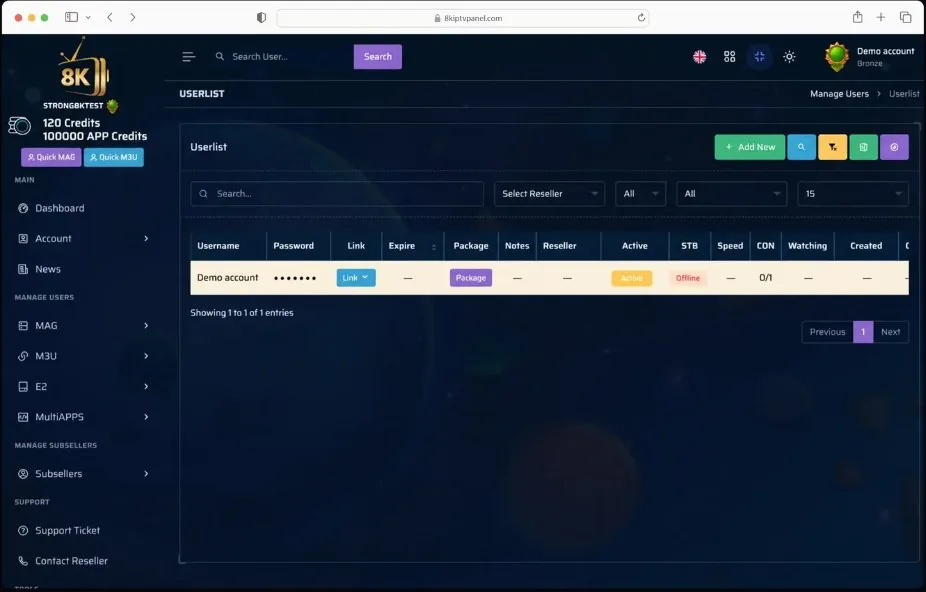
Customer-line list
Then search, filter and manage every customer line from one organised list.
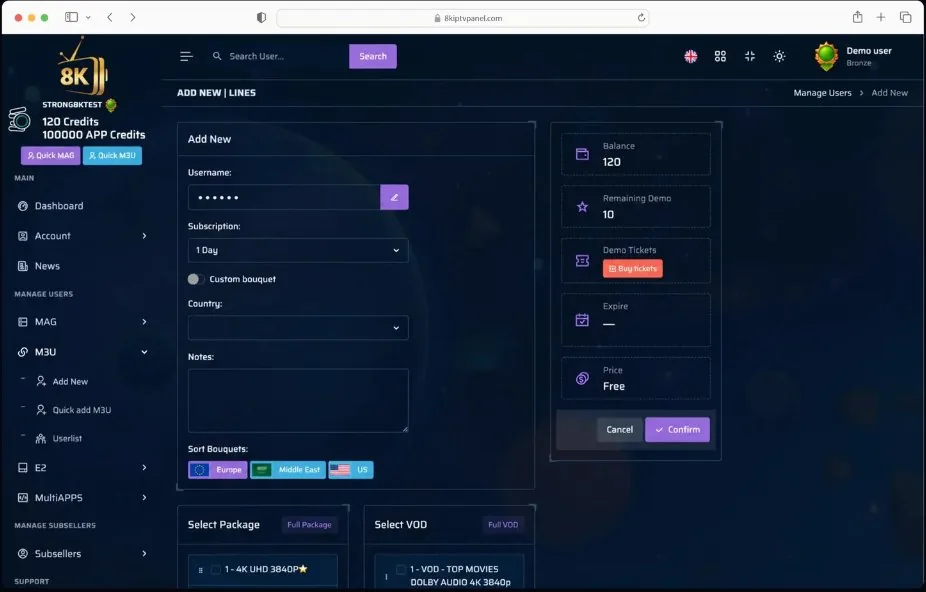
Create a new line
Next, pick the username, subscription length, country and channel bouquets, then confirm.
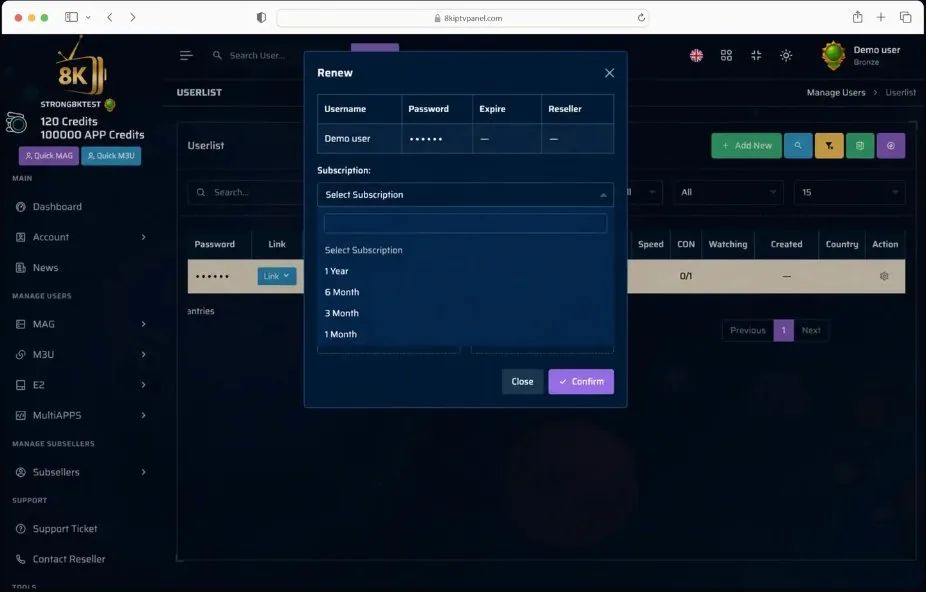
Renewal workflow
Finally, renew an existing line for 1, 3, 6 or 12 months in a few clicks.
First-time panel setup: We set up your reseller panel for you on the first order — branded and ready so you can create lines the same day.
120 credits pack: $3.6 per credit. Each credit = 1 month. A 1-year line costs you $26 (12 credits).
240 credits pack: $3.4 per credit. Each credit = 1 month. A 1-year line costs you $20 (12 credits).
Pricing Packages
One-time payment · refill anytime
120 Credits (10 Years)
$3.6 / credit · 1 year = $26
- Customize bouquets
- 10 free trials / day (24h)
- Pro VPN + ISP option
- Pro player included
- Uptime + content updates
- Move device · refund access
- Live chat 24/7
- All devices + logs
Payment one time — possible for refill
240 Credits (20 Years)
$3.4 / credit · 1 year = $20
- Customize bouquets
- 10 free trials / day (24h)
- Pro VPN + ISP option
- Pro player included
- Uptime + content updates
- Move device · refund access
- Live chat 24/7
- All devices + logs
Payment one time — possible for refill
Panel ranks and daily free trials
Your rank grows with every credit pack you buy. As a result, each new rank unlocks more free 24-hour trials per day for your customers.






How to run your reseller panel day to day
Buying credits is the easy part. This short guide covers what comes next: how many credits you need, which line type to create, how to tailor channel bouquets, what the customer list is telling you and how to renew lines without mistakes.
How many credits do you need?
One credit equals one month on one line, so a 3-month line uses 3 credits and a 12-month line uses 12. Multiply each customer by the months they ordered, then add the totals.
| 1 Year | 12 Credits |
|---|---|
| 6 Months | 6 Credits |
| 3 Months | 3 Credits |
| 1 Month | 1 Credit |
| 1 Day Trial | 0 Credits |
Trial lines are free. Your panel rank sets how many 24-hour demo lines you can create each day.
A sensible first month while you test your market.
Exactly one 120-credit pack.
Five 6-month lines plus ten 3-month lines.
Keep a small reserve for the renewals due this month. APP credits are a separate balance from line credits, so the two are not interchangeable.
Pick the right line type
Ask the customer which device and app they use before you press Add New. The panel has a separate area for each type.
- M3U / XtreamPlaylist or Xtream login for Smart TV apps, Firestick, Android boxes and phones. Quick M3U creates one in seconds.
- MAGPortal line linked to the box MAC address, for MAG-style set-top boxes. Quick MAG is there too.
- E2For Linux receivers running Enigma2. Check the receiver model and setup method first.
- MultiAPPSA separate area for supported player apps. Confirm the customer's app is supported before you activate it.
Full package or custom bouquet?
Full package
Selects every live TV category in one click, and Full VOD does the same for movies and series.
Best when the customer wants everything or is not sure yet.
Custom bouquet
Switch on Custom bouquet and keep only the countries, languages and VOD categories the customer really watches.
Best for single-language viewers and older devices, because a shorter menu is quicker to browse.
You can change bouquets later from the Package button in the customer list. Ask the customer to restart their app after you save.
What the customer list is telling you
The date the line stops. Sort by it to see who needs a renewal reminder.
The line ends soon. Message the customer, but do not renew until they confirm the length and payment.
Nobody is watching at this moment. It does not mean the line is broken.
Connections in use against connections allowed, for example 0/1. Check it first when someone reports a connection-limit error.
Shows activity on a line that is online. Useful for support, and always kept private.
A renewal routine that avoids mistakes
- 7–3 days before expirySend one clear reminder with the options: 1, 3, 6 or 12 months.
- ConfirmGet the length and the payment confirmed in writing.
- RenewSearch the username, check the current expiry date, pick the duration and press Confirm.
- VerifyCheck the new expiry date in the list and update your own records.
Keep your panel and customers safe
- Never give your reseller login to customers. They only need their own line details.
- Use a long, unique password kept in a password manager, and turn on two-step sign-in for the email linked to your panel.
- Working with a partner? Create a sub-reseller account for them instead of sharing your main login.
- Blur usernames, passwords, links and the address bar before you post any panel screenshot.
- Sign in only from your own devices and check the panel address before you type your password.
- Use the Notes field for a customer reference, never for passwords or personal details.
The 30-second check before every action
Reseller panel questions
How many credits does a 12-month line use?
Twelve. Each month costs one credit, so 1, 3, 6 and 12-month lines use 1, 3, 6 and 12 credits.
Can I change a customer's channels after creating the line?
Yes. Open the line from the customer list, press Package and switch between Full package and a custom bouquet. Save, then ask the customer to restart their app.
Does Offline mean the line has a problem?
No. Offline only means nobody is connected at that moment. If the customer reports an issue, check the expiry date, the CON column, their device and their internet first.
What should I do when a line shows Almost expired?
Send a reminder and wait for the customer to confirm the length and payment before you renew. Renewing without confirmation wastes credits.
Are line credits and APP credits the same?
No. The dashboard shows them as separate balances. Use each one only for its own purpose and ask support if you are unsure.
Can I share my panel with a partner?
Create a sub-reseller account for them. Your main login stays private and you stay in control of their access.
Resell only where you are allowed to distribute the service, and describe it honestly to your customers.
Refund policy:
We believe you will enjoy the service. If you change your mind, we guarantee a refund within 48 hours of placing the order. Please test the panel during that time to make sure it fits your needs.
Apple Pay
Google Pay
IPTV Playlist Trial
Free Trial IPTV
You are welcome to request the free iptv trial, where your satisfaction is our top priority. message us now and get your free test.
